Beat Bounce Music Ball Game APK For Android Players
| Updated | Now |
| Size | 486.26M |
| Version | v3.1.5 |
| Requirements | Android 5+ |
| Downloads | 100k+ |
Description
Beat Bounce is a music-based ball game that combines sound, movement, and colorful environments to create an enjoyable experience for Android players. Instead of controlling a character in a fighting arena or racing across a track, you guide a bouncing ball through musical sections. Each movement connects with the rhythm, so listening carefully becomes an important part of the game. The changing backgrounds and smooth animations also make each session more interesting.
Players who enjoy casual games can explore Beat Bounce when they want something different from regular action titles. The game focuses on timing, musical patterns, and creative play rather than complicated missions. You can learn the basic controls quickly, but keeping your movements in line with the music takes practice. Its level creation tools also give players another reason to return and try different ideas.

A Different Kind of Music Adventure
Beat Bounce gives music a more active role than simply playing in the background. The ball moves through a world shaped by rhythm, and each section offers a new visual experience. Your task is to follow the musical flow while paying attention to the movement ahead. This approach makes the game suitable for short breaks as well as longer sessions when you want to explore more content.
The game also moves away from the fixed paths found in many traditional rhythm titles. Its environments can offer different routes and changing scenes, giving players more freedom during play. Instead of focusing only on reaching the end of a track, you can enjoy how movement, sound, and visuals work together. The result is a relaxed but engaging experience that rewards patience and good timing.
Features That Make the Game Interesting
Music That Guides Every Move
Sound plays a central role in Beat Bounce. The ball’s movement follows musical patterns, allowing players to connect what they hear with what happens on the screen. Paying attention to the beat can help you understand when to tap and how to approach the next section. Different musical styles can also change the mood of a session.
This design makes the game appealing to people who enjoy rhythm challenges without needing to master a large set of controls. You can focus on the soundtrack while watching the ball move through the environment.
Colorful Visual Environments
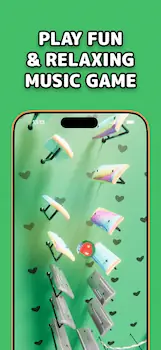
The game uses bright colors, lighting effects, and smooth animations to support its musical style. Visual changes make the journey more attractive and help create a different atmosphere as you continue playing. These details are not only decorative; they also add to the feeling that the game world is responding to the music.
Players who enjoy visually pleasing mobile games may find this style especially enjoyable. However, the overall experience can depend on your device’s screen, performance, and graphics settings.
Creative Level Editor
One notable feature of Beat Bounce is its level editor. This tool allows players to experiment with different elements, such as instruments, walls, balls, and visual effects. Rather than playing only the available stages, you can explore ideas for building your own musical challenges.
The editor adds a creative side to the experience. Players can test different arrangements and develop levels that match their preferred rhythm or visual style. Depending on the available sharing features, custom creations may also provide opportunities to exchange ideas with other players.
Simple Controls for New Players
The basic controls are easy to understand, which helps beginners get started without a long tutorial. Tapping in time with the beat is one of the main ways to interact with the game. Some gameplay sections may also require directional movement, so it is useful to understand the controls offered in your selected mode.
Simple controls do not mean every section will be easy. As the music changes, you may need to react more carefully and maintain a steady rhythm.
How to Begin Playing
Starting Beat Bounce is straightforward once you have installed the game and opened it on your device. Spend a little time learning the available menus before entering a level. This helps you understand where to select music, adjust options, and access other gameplay features.
Follow these basic steps to get started:
- Open the game and explore its main menu.
- Choose an available song or level.
- Check the control instructions before starting.
- Watch the ball’s movement and listen to the beat.
- Use the required input to keep the ball moving through the level.
- Try another stage when you feel comfortable with the controls.
Do not worry about getting every movement right during your first attempt. A few practice sessions can help you recognise patterns and improve your timing.
Playing With Better Rhythm
Success in Beat Bounce depends on attention and consistency. Rushing through a section without understanding its musical pattern can make the experience more difficult. Try to observe how the ball moves and connect that movement with the sound. Once you become familiar with the rhythm, your actions may feel more natural.
Tips for Smoother Sessions
- Listen before tapping: Pay attention to the soundtrack so you can recognise its rhythm.
- Avoid random inputs: Tapping without a clear sense of timing can make some sections harder.
- Practise difficult sections: Repeat challenging parts when the game allows you to do so.
- Explore different music: Another track may offer a rhythm that feels easier to follow.
- Use comfortable settings: Adjust audio and other available options to suit your preferences.
- Take short breaks: Resting your eyes and ears can help you stay focused during longer sessions.
These habits can improve your comfort with the game over time. Your progress will depend on the level, the controls, and how familiar you become with its musical patterns.
Make Your Own Musical Levels
The level editor provides a different way to enjoy Beat Bounce. Instead of following a prepared stage, you can experiment with the tools available to build a custom experience. Try changing one element at a time so you can understand how each choice affects the finished level.
Start with a simple design rather than adding too many effects immediately. Choose a musical idea, arrange the available objects, and test how the ball moves through your layout. If something feels confusing, make a small adjustment and test it again. This method makes experimentation easier and helps you understand the editor’s options.
Creative players may enjoy this feature because it gives them more control over how a stage looks and feels. Still, the available tools and sharing options can depend on the game’s current version.
What Makes Beat Bounce Worth Trying?
Beat Bounce can be a good choice for players who enjoy music, relaxing visuals, and simple interactive challenges. It does not require the same type of planning as a strategy game or the fast reactions needed in a competitive shooter. Instead, it asks you to focus on sound, movement, and the changing environment.
The creative editor also gives the game another layer of interest. Players who like making things can spend time experimenting with their own layouts instead of moving directly from one stage to another. The combination of music and creation makes the game suitable for different play styles.
However, it may not satisfy everyone. Players who prefer deep stories, complex combat, or detailed character development may find its main gameplay loop too simple. Some features may also require extra time to understand, particularly if you want to create your own stages.
Pros and Cons
Pros
- Easy controls for beginners.
- Music and movement work together.
- Attractive colors and animated environments.
- A level editor supports creative experimentation.
- Suitable for short gaming sessions.
- Different stages can encourage repeated play.
Cons
- The main gameplay may feel repetitive to some players.
- Rhythm-based sections require patience and practice.
- Certain creative tools may take time to learn.
- Advertisements or in-app purchases may affect the experience.
- Performance can vary between Android devices.
These points can help you decide whether the game suits your interests. Your experience may differ depending on the version you install and the features available to you.
Download and Installation Guide
If you want to try Beat Bounce on Android, begin by checking its official Google Play listing. Confirm the developer name, supported device requirements, and current version before installing it. The official listing is the preferred starting point because it provides the game’s published information and available installation options.
If you are considering an APK file, use a trustworthy source and verify that the file matches the intended game. Avoid modified packages from unknown websites, as they may contain unwanted software or request unnecessary permissions. Do not disable device security protections simply to install a file from an unfamiliar source.
After installation, open the game and check whether it runs smoothly. Review its available settings and make sure you understand any optional purchases before using them.
Safety and Device Requirements
Before downloading Beat Bounce, check your available storage and Android compatibility. Keeping enough free space can help your device operate comfortably, especially if the game includes additional resources or downloadable content. A stable device and suitable audio settings can also improve your experience.
Review the permissions requested during installation and use. A music game should not need unrelated access without a clear reason. Read the privacy information and check whether optional features involve account access, data sharing, or purchases. If anything seems unnecessary or unclear, investigate it before continuing.
Use official updates whenever possible, and avoid sharing personal information through unofficial game pages or groups. These simple precautions can help protect your device and accounts.
Frequently Asked Questions
Is Beat Bounce suitable for beginners?
Yes, its basic controls are easy to learn. Beginners can start with available levels and improve their timing through practice.
What type of game is Beat Bounce?
It is a music and rhythm game built around a bouncing ball, musical patterns, changing environments, and interactive level challenges.
Can I create my own levels?
The game includes a level editor that lets players experiment with musical and visual elements. The available editing tools may vary by version.
Does Beat Bounce work on every Android phone?
Not necessarily. Compatibility depends on your device and the game’s current requirements. Check the official listing before installing it.
Is Beat Bounce free to play?
The game is listed with advertisements and in-app purchases. Check the current store information to understand which features are free and which may require payment.
Where should I download Beat Bounce?
The official Google Play listing is the recommended place to check the game and install it when available for your device. Be careful with APK files from unknown sources.
Conclusion
Beat Bounce offers a music-focused gaming experience built around rhythm, ball movement, colorful environments, and creative level design. Its simple controls make it approachable for new players, while its changing musical sections give you opportunities to practise and improve. The level editor adds extra value for people who enjoy experimenting with their own ideas rather than playing only prepared stages.
If you like casual music games with attractive visuals and room for creativity, Beat Bounce may be worth trying on your Android device. Check the game’s official listing for current details, install it from a reliable source, and explore its features at your own pace. With a little practice, you can become more comfortable with its rhythms and enjoy building your own musical challenges.